The notepad that opens anything. Instantly.
NeoPad opens multi-gigabyte logs in a blink, edits Word and Excel files, keeps your notes as plain Markdown and cleans email lists by the thousand. Fast, private, and right on your PC.
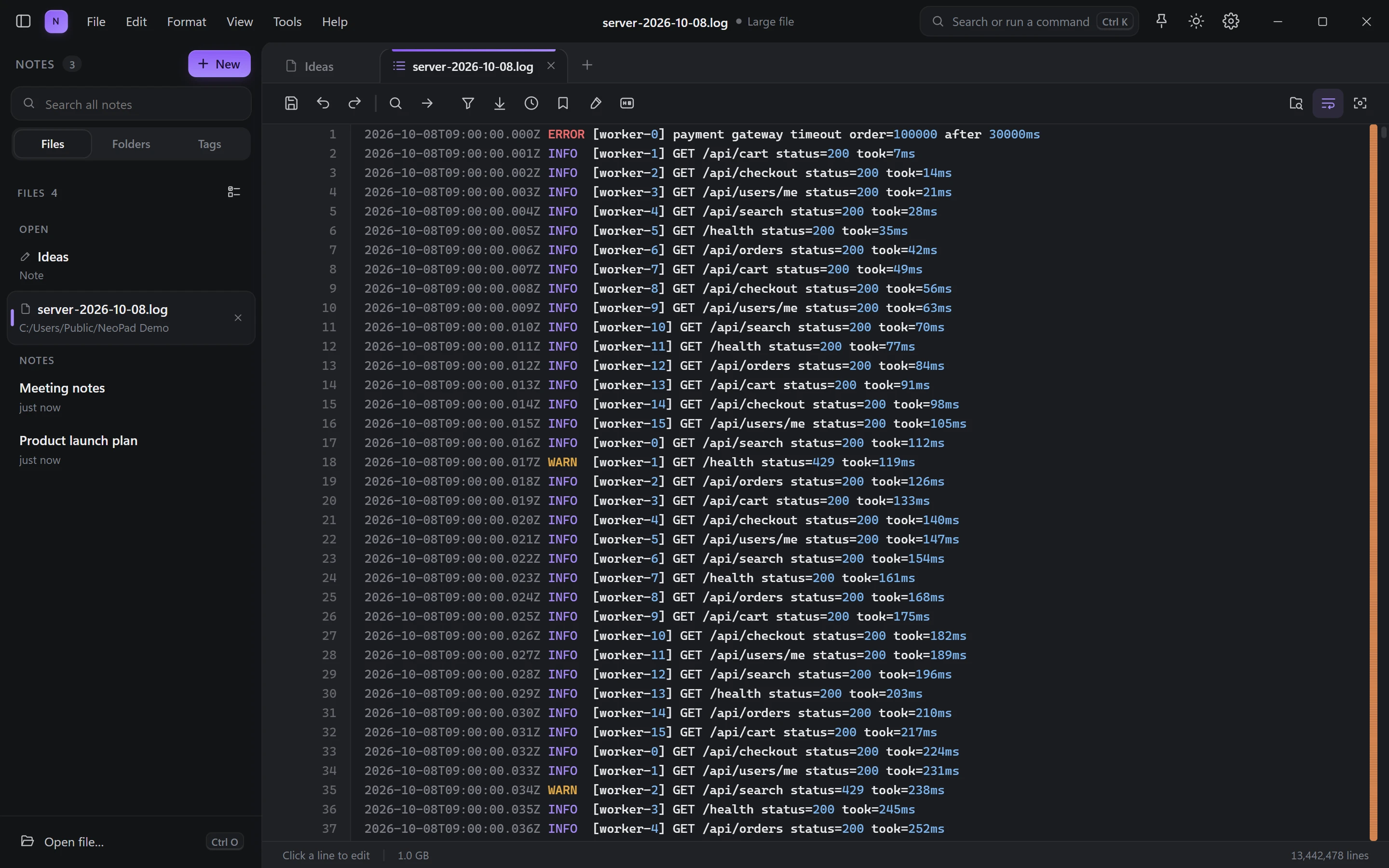
Measured with a 1 GB log of 11.5 million lines on an Intel Core i9-10900K with an SSD. Your times depend on your PC.
Stop juggling five programs
Logs, documents, spreadsheets and notes open in tabs, side by side, in one window that starts in under a second.
Logs and huge files
Open multi-gigabyte logs, CSV exports and database dumps without waiting. Scroll, search and filter millions of lines as if the file were tiny.
- Filter to matching lines in a blink
- Highlight rules, bookmarks and an error map
- Edit any line and save, even in huge files
- JSON folding and colours for code and data
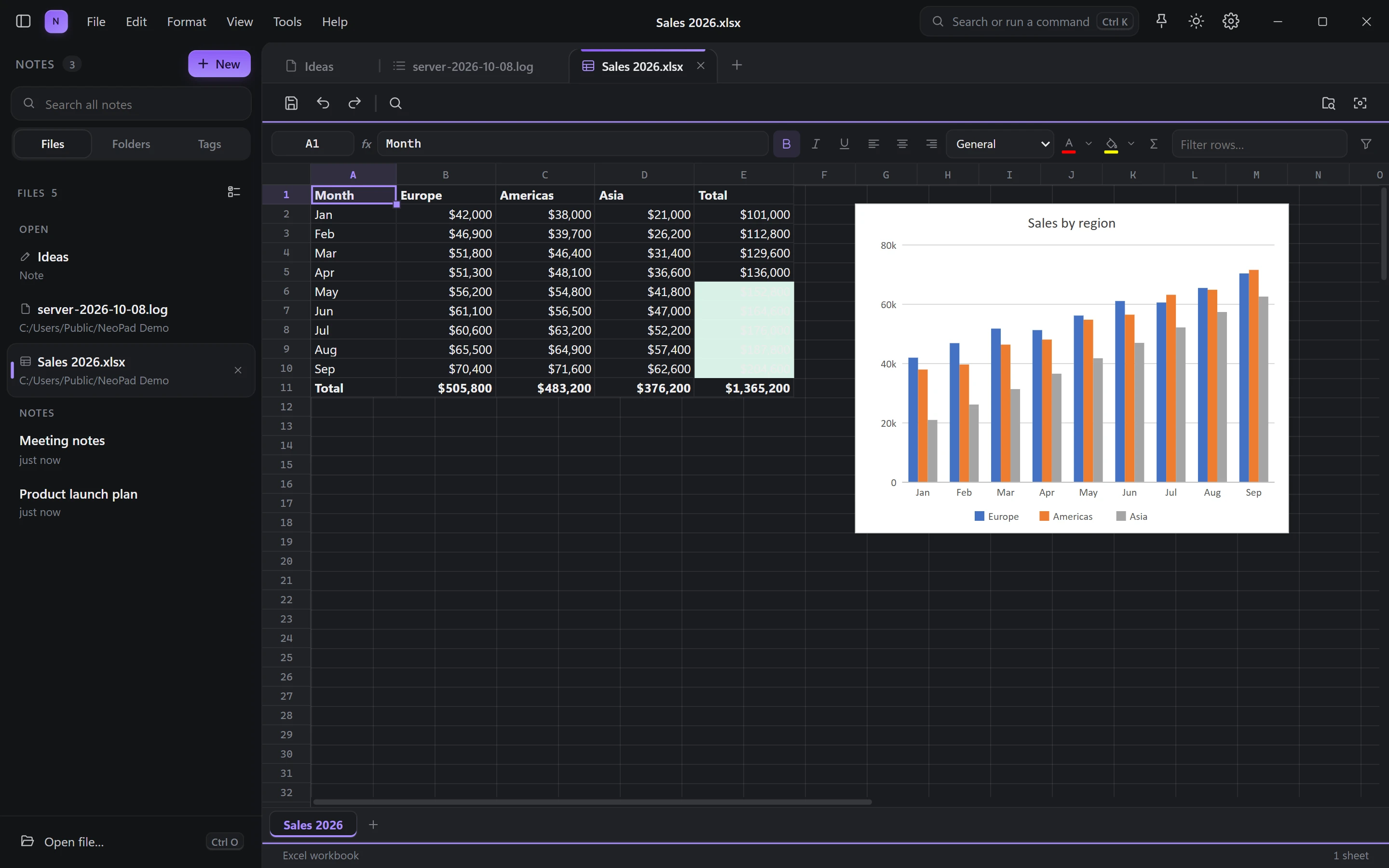
Excel workbooks
Open .xlsx files with their formulas, number formats, colour rules and charts. Edit a cell and every formula updates, then save back to the same file.
- Formulas, AutoSum, fill handle and filters
- Charts drawn from live values
- Huge CSV files as a table
- Old .xls files open too
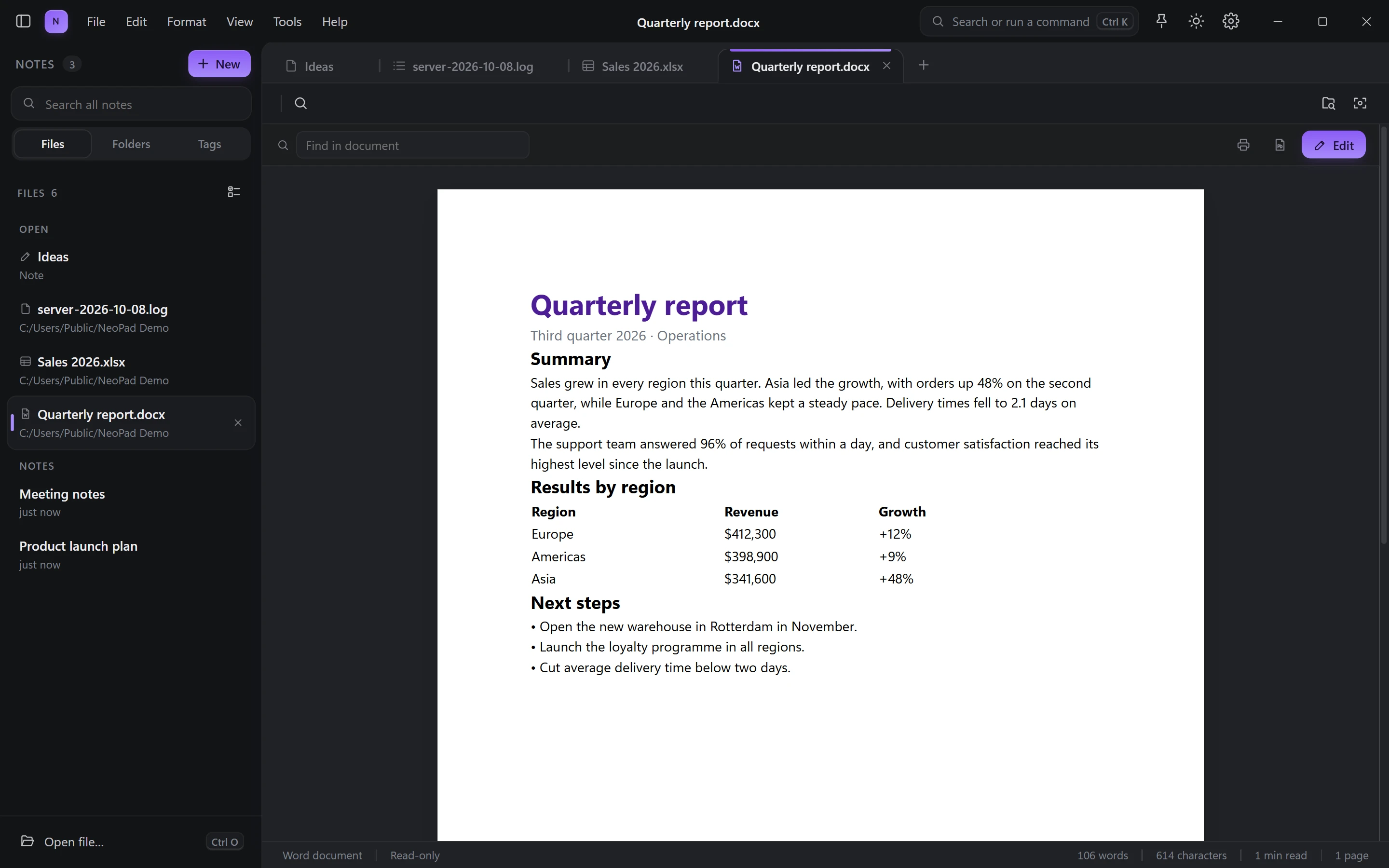
Word documents
Read .docx files as real pages, find any word, print or save as PDF. Edit text, tables and pictures; everything you didn't touch stays exactly as it was.
- Headers, footers, tables and pictures
- Track changes, comments and replies
- Page setup, word count and PDF export
- Old .doc files open as new copies
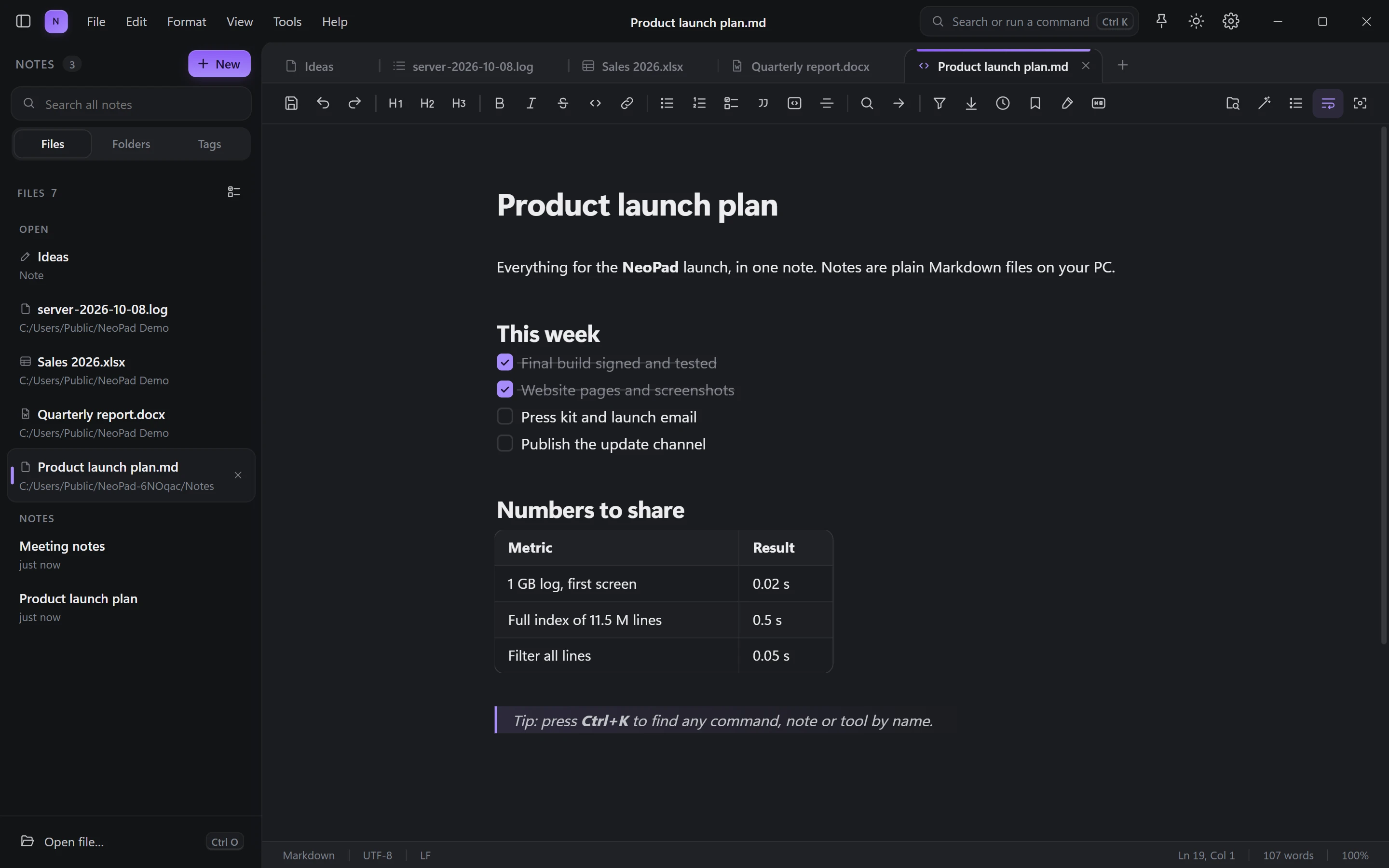
Notes you own
Write in Markdown that formats itself as you type. Every note is a plain file in a folder on your PC: no lock-in, no proprietary database.
- Checklists, tables, quotes and code
- Folders, tags and search across all notes
- Version history: restore any earlier save
- Unsaved work survives a crash or power cut
Up to four files side by side
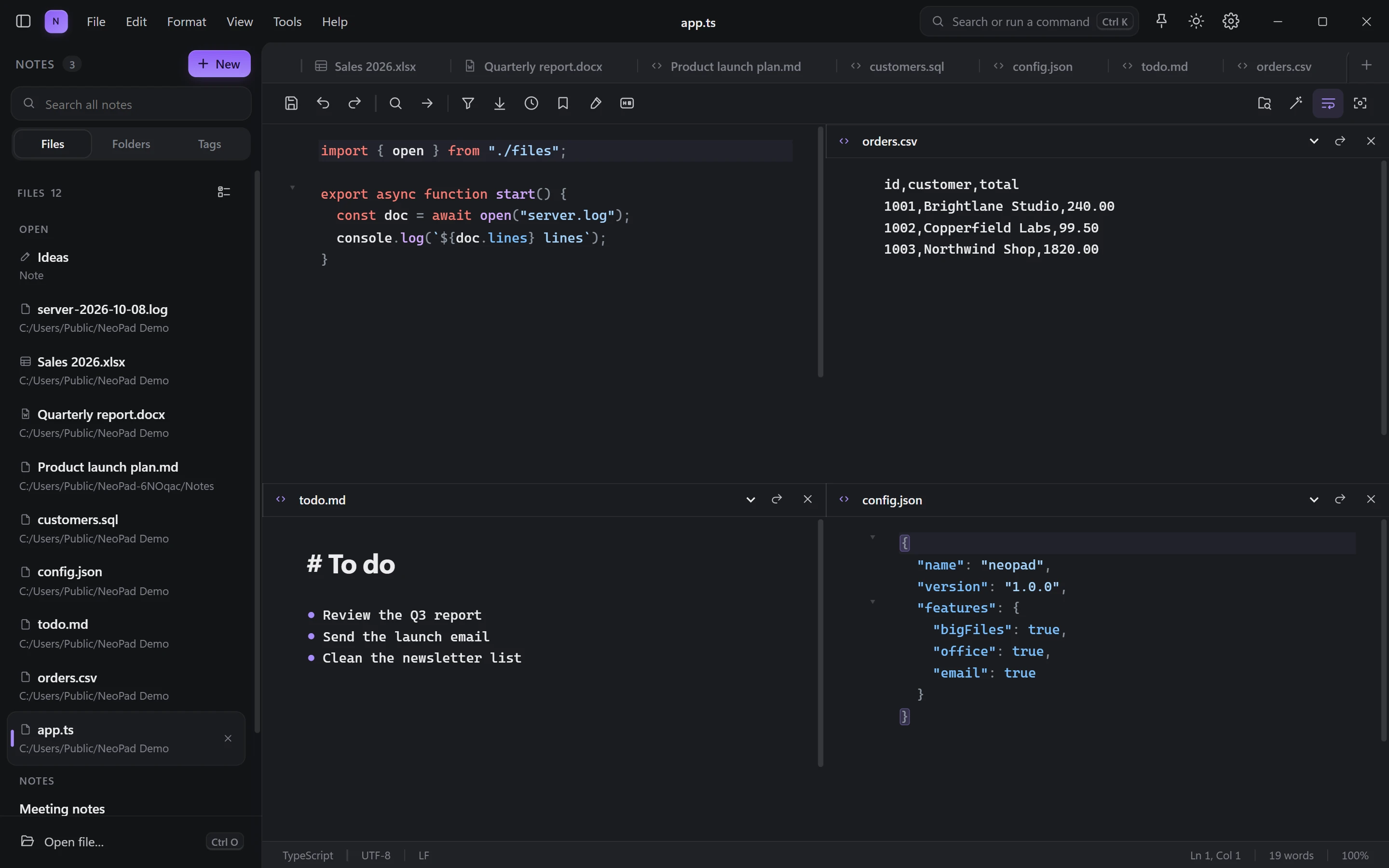
Compare a config with its log, or write while you read. Split the window in two, three or four panes, each with its own file.
- Side by side, top and bottom, or a 2×2 grid
- Ctrl+S saves the pane you are typing in
- Split a big file into parts, or merge many into one
- Command palette: Ctrl+K finds any tool
Email tools that usually cost a subscription
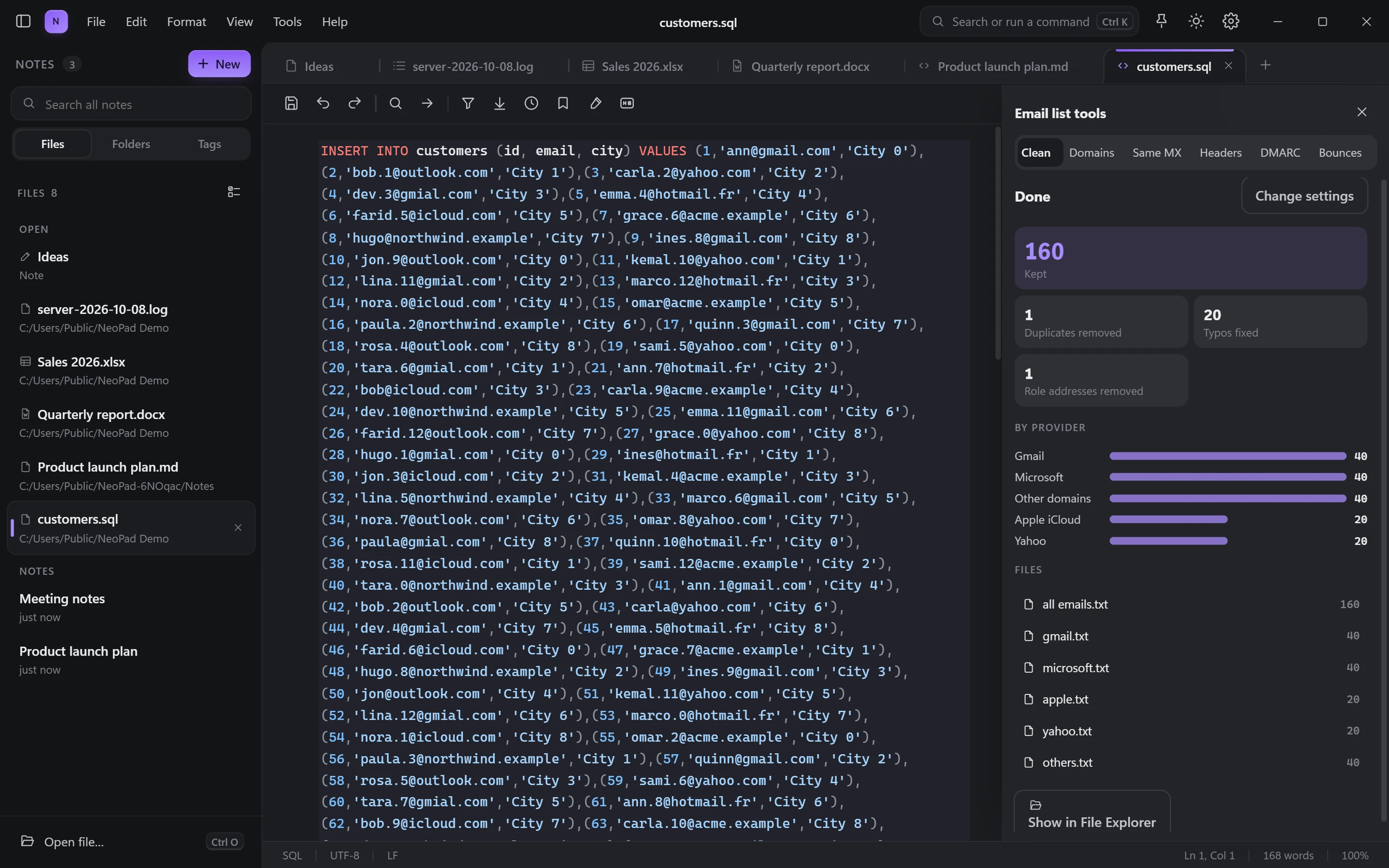
Clean lists, check domains and find who shares a mail server, all on your PC. Your lists never leave it.
From a messy export to clean lists in seconds
Drop in a CSV, a text file or even a SQL dump. NeoPad pulls out every address, fixes typos, removes what you don't want and splits the rest the way you like.
- Fixes typos like gmial.com
- Removes duplicates and role addresses (info@, admin@)
- Splits by provider: Gmail, Microsoft, Yahoo and more
- Results saved as files, ready to import
Find every domain on the same mail server
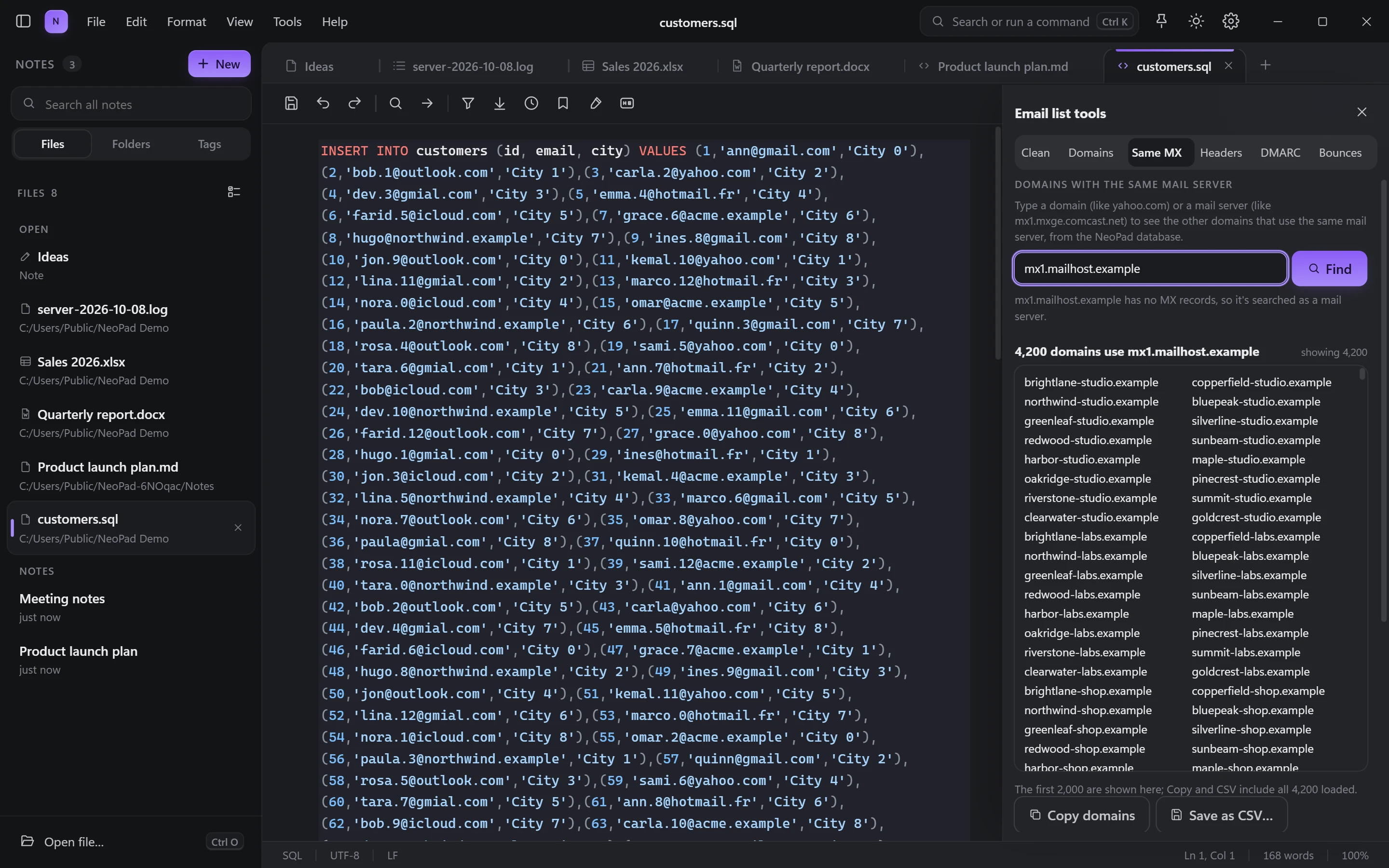
Type a domain or a mail server and see which other domains send their mail there, from the NeoPad database of millions of domains. No API key, no per-query fees.
- Millions of domains, and growing
- Search one server or all of a domain's servers
- Copy, export to CSV, or check the results
- Match inside your own lists too
Check domains
MX, SPF, DMARC, DKIM, PTR, BIMI and MTA-STS, plus blacklists, for thousands of domains at once.
Header analyzer
Open a .eml and see the route, the delays and why SPF, DKIM or DMARC passed or failed.
HTML email preview
Preview newsletters, move CSS into the tags, check images and links, copy the HTML.
DMARC reports
Turn the XML reports Google and Microsoft send you into a clear list of who sends as your domain.
Bounce analyzer
Group bounces by reason and spot the blocks that hurt your sender reputation.
Free to start
Clean up to 2,000 addresses and check 25 domains at a time for free. Pro removes every limit.
The little tools you reach for every day
All built in, all fast, all working offline.
Private AI
Summarize, rewrite, translate and ask questions about your notes with an AI that runs on your PC, offline. Or bring your own: Ollama, OpenAI or Claude.
Screenshots
Pick a region or a window, mark it up, blur private parts, and copy the text in it.
Screen recorder
MP4 with your computer's sound and microphone, or a GIF, with your camera in a circle.
Collect files
Gather every file of a type from all subfolders into one place, and unpack .zip, .7z, .rar or .xz on the way.
Split and merge
Cut a huge file into parts by lines or size, or merge files with the CSV header kept once.
Developer toolkits
Snippets, UUIDs, hashes, Base64, JWT, timestamps, IOC extraction and hidden secrets in .env files.
11 languages
English, French, Spanish, Portuguese, Arabic, Hindi, Russian, Turkish, Japanese, Korean and Chinese.
Locked notes
Protect private notes with a password. They are encrypted on disk.
Your files stay yours
NeoPad works on your PC, offline. No account, no cloud copy of your documents, no tracking of what you write. Your notes are plain files you can open with anything, forever.
Free to use. Pro once, yours forever.
No subscription for the app. Try every Pro feature free for 14 days.
Free
The fast editor, notes and office viewer, for everyone.
Free forever
- Huge files, logs and CSV
- Markdown notes and version history
- View Word and Excel files
- Email tools with limits
Pro
Everything, with no limits. One payment, no subscription.
Pay once, use it forever
- Edit and create Word and Excel files
- Email tools without limits
- Same MX: every result
- Private AI, screenshots and recorder
Sync
Your notes on all your devices, end-to-end encrypted.
Add-on to Free or Pro
- Notes on every PC you use
- Encrypted before they leave your PC
- Both versions kept if edited twice
Questions
Is NeoPad really free?
Yes. The editor, huge files, notes, Word and Excel viewing and the email tools (with limits) are free with no time limit. Pro unlocks editing Office files, the email tools without limits, private AI, screenshots and the screen recorder.
Which Windows versions does it run on?
Windows 10 and Windows 11, 64-bit. The download is about 6 MB.
How big a file can it open?
Multi-gigabyte files open instantly: NeoPad reads only the part you're looking at and indexes the rest in the background. A 1 GB log with 11.5 million lines is fully indexed in about half a second on a recent PC.
Do my files or email lists get uploaded anywhere?
No. Everything happens on your PC. The only things that use the internet are the update check, the Pro licence check, domain lookups you ask for (DNS), the optional AI model download, and Same MX searches, which send just the mail server name you typed.
Is Pro a subscription?
No. Pro is a one-time payment of $24. Sync, when it launches, is an optional monthly add-on because it runs on our servers.
Does it work offline?
Yes. Everything works without internet except the online lookups you ask for, like checking domains or Same MX.

Open your biggest file.
Watch it appear.
Free download for Windows 10 and 11. Pro trial included.
Download for Windows